How to Choose an Online Booking System for a Small Business
 By MatrisAI10 min read
Compare booking software by services, team schedules, payments, and customer experience. Use this checklist to plan your online appointments.

The right online booking system for a small business depends on how you deliver each service, who provides it, and how customers should pay. Start with that booking journey, then compare the tools, costs, and setup steps that support it.
A short list of must-haves can make the comparison clearer than a long feature checklist.
In this article (10)
- What an online booking system does for a small business
- Choose how customers will book
- Match the booking system to your business type
- Features to compare before choosing
- How much does a booking system cost?
- Compare booking tools and alternatives
- Set up online booking in practical steps
- How MatrisAI handles salon appointments
- Common mistakes to avoid
- Online booking system questions
What an online booking system does for a small business
An online booking system lets customers see available appointment times and choose one without calling or emailing. Depending on the service, customers may also choose what they need and who they want to see. The business can then keep the appointment details in a place the team can refer to.
Appointment scheduling software is usually centered on time slots and appointments. A broader booking platform may also support different types of bookings, such as classes, stays, rentals, or events. The distinction matters: a solo consultant with a few appointment types may need a different workflow from a salon coordinating several team members.
Online booking can give customers a way to request an appointment outside your staffed hours. It can also help organize appointment details and reduce the back-and-forth involved in agreeing on a time. To judge whether a system fits, trace what happens from selecting a service through confirmation and any follow-up the business needs to handle.

Choose how customers will book
There are three common ways to make online booking available. Each can suit a different starting point:
- Share a booking link: Put the link in places where customers already find your business, such as an email or social profile. This can be a practical option if you do not want to build a full website.
- Add booking to your website: A booking tool may offer an embedded booking area, or the website may direct visitors to a separate booking page. This keeps the booking route connected to your business information.
- Use a marketplace listing: Customers browse a platform that lists businesses or services. Check how your business will appear, what information you control, and whether the marketplace charges fees or sets rules.
A booking link is direct and easy to share, but customers may need to leave the page they are viewing. A website booking route can keep business details and appointment choices together, while a marketplace may provide a directory-style browsing experience. Consider which path is clearest for the people you serve and how much setup and ongoing profile management you want.
You can offer online booking without building a full website. A link can provide a route to booking, while a website can also explain your services, location, policies, and team. If you already have a website, check whether the booking tool can be embedded or linked in a way that works on mobile.
Match the booking system to your business type
Begin by describing the booking pattern, not by choosing software. Ask whether customers book one-to-one appointments, a place in a group session, or a service that involves several team members. Consider how many appointment types you offer and whether each needs a different length or availability.
For a solo business with one service and one calendar, a straightforward scheduling link may cover the essentials. A salon or other service business with several staff members may need customers to choose a team member and see availability that reflects each person's schedule. A class business may need a way to manage group capacity, which is different from giving one customer a private time slot.
Write down the requirements that matter for your workflow:
- Services customers can book and how long each appointment takes.
- Which staff members can provide each service.
- Working hours, time off, and any gaps needed between appointments.
- Whether customers choose a specific person or any available person.
- How you handle cancellations, changes, and late arrivals.
Then use those requirements to rule out mismatches. For example, if clients must select both a service and a team member, confirm the tool supports that journey. If durations, buffers, or different staff availability matter, verify those details directly with the provider before relying on them.

Features to compare before choosing
Compare the customer experience and the day-to-day work behind it. A system can look suitable in a feature list but still be a poor fit if it does not reflect your booking rules or if customers find the flow unclear.
- Availability: Check how the system handles staff schedules, appointment lengths, and unavailable times.
- Customer messages: Look for booking confirmations and reminders. Find out whether customers can change or cancel an appointment and what controls the business has.
- Payments: Check whether you can collect a deposit, the full amount, or no online payment. Review payment-provider charges and how funds are paid out.
- Mobile use: Test the booking journey on a phone, including reading service details and selecting a time.
- Website and appearance: Check how the booking page fits your business and whether the booking link or embedded option is available.
- Limits and support: Read plan limits for staff, calendars, appointments, and features. Check what help is available if you need to change your setup.
Calendar syncing, integrations, rescheduling controls, and staff limits are not standard across every provider. Treat each as a question to verify, rather than assuming it is included. Ask what happens when a team member's availability changes and whether the booking tool updates the times customers can select.
How much does a booking system cost?
Booking system pricing can include a free tier, a paid subscription, payment-processing charges, or fees tied to bookings. The exact combination depends on the provider and plan. Review the current pricing and terms instead of comparing subscription prices alone.
Before choosing a free booking software plan for a small business, check what it limits. Look for caps on staff, calendars, appointments, booking pages, reminders, or payment options. A free plan may be enough for a basic workflow, but a limit can matter if the business relies on a feature that is not part of it.
Estimate the full cost over a typical month. Include the subscription, any per-booking charge, payment-provider fees, and time spent maintaining the system. Then compare those costs with the work the system is intended to organize. Avoid assuming a particular amount of time saved or appointments gained; your workflow and customer behavior determine whether the arrangement makes sense.
For MatrisAI plan details, see the current pricing and plan information. Check which plan covers the functions your business wants to use.
Compare booking tools and alternatives
Instead of starting with a ranked list, make a comparison table around your own requirements. Include any tools you already use, basic scheduling links, appointment platforms, and booking features attached to a website or marketplace.
| What to compare | MatrisAI |
|---|---|
| Booking flow | Clients choose a service, a person, and an available time. |
| Team scheduling | Clients see only free times in the team's schedule. Every booking appears in the team calendar in the admin. |
| Payments | The business can request a deposit, the full price by card, or no online payment. Card payments go to its own Stripe account. |
| Trial and cancellation | Every plan starts with a free trial, with no card required to start. The plan can be canceled from the billing page at any time. |
| Business website | MatrisAI builds the site from the owner's description. The business can use its own domain on every plan. |
If you are comparing a basic scheduling tool with a broader appointment platform, focus on the parts of your workflow that a simple link may not cover: multiple services, staff choices, online payments, or a business-branded site. When assessing an alternative to a tool you already use, list the features you rely on and the problems you want to solve. Then check each candidate against those requirements, including its plan limits and how you would move customers to the new booking route.
Set up online booking in practical steps
Set up the customer journey in order, then test it before sharing the link widely. These steps work as a checklist for comparing providers or preparing an appointment workflow.
- Write down your booking rules. List each service, who provides it, its duration, availability, and whether the customer should choose a specific team member.
- Decide how customers will pay. Choose whether you want to collect a deposit, the full price, or no payment online. Check payment-provider fees and payout arrangements.
- Choose the customer route. Decide whether to share a booking link, add a booking route to your website, or create a marketplace listing. Make sure customers can find the route where they already interact with your business.
- Set up the booking details. Add the service and staff choices, then check that the times shown match the availability you intend to offer.
- Review confirmations and reminders. Check what customers receive after booking and before the appointment. Review cancellation and rescheduling options if your provider supports them.
- Test on a phone. Walk through the flow as a customer: choose a service, select a person if applicable, pick a time, and complete the payment step if enabled. Check the resulting confirmation.
- Share the booking route. Add the link to the places customers use, or connect it from your website. Revisit the flow when services, staff, or availability change.
How MatrisAI handles salon appointments
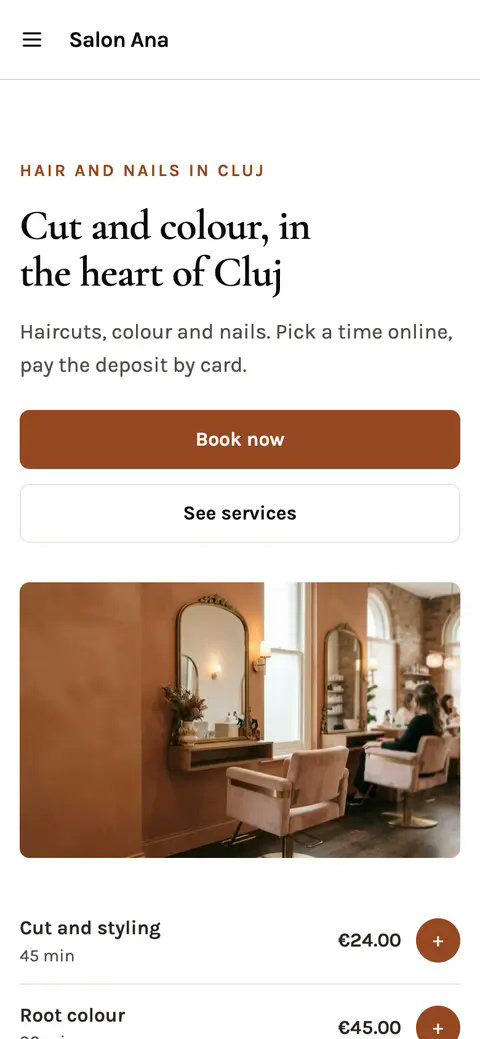
MatrisAI is built for salons and appointments. The owner describes the business in their own words, and MatrisAI builds the site from that description. The owner can start working in the admin while the design is still being finished, then change the site's text, photos, and look from the admin.
For appointment booking, clients choose a service, the person they want, and a free time. The system only offers times that are actually free in the team's schedule, and every booking lands in the team's calendar in the admin. Clients get an email confirmation and a reminder before the appointment.
The business can ask for a deposit or the full price by card when a client books, or take no payment online. Card payments go to the business's own Stripe account, which pays out to its bank. A card can also be saved at booking so a no-show or late-cancellation fee can be charged, up to the amount the client accepted.
MatrisAI can also sell gift vouchers online for customers to spend on a booking, and the site can show a WhatsApp button so customers can still send the business a message. From the Grow plan, the site can carry Meta, Google, and TikTok tracking so the business can measure its own ads, and customers can receive an email after their visit asking them to leave a Google review. On the Pro plan, automatic emails can invite clients to book again when it is time for their next visit.
Every plan starts with a free trial before the first payment, and no card is asked for to sign up or start the trial. The business can use its own domain name on every plan, and the plan can be canceled at any time from the billing page. See MatrisAI appointment booking for salons for details.
- Describe your salon and how appointments work in your own words.
- While the design is being finished, start working in the admin.
- Set up the services and team choices customers need for booking.
- Choose whether to request a deposit, the full price by card, or no online payment.
- Test a booking by selecting a service, person, and available time, then check the team calendar and customer email.
- Review the site text, photos, and look in the admin, and adjust them as needed.
Common mistakes to avoid
Choosing from a long feature list can distract from the booking flow customers actually use. Start with the services, staff, and payment choices you need, then confirm that the system supports them.
Another common oversight is checking the subscription while missing plan limits or payment-related charges. Read the terms for the plan you expect to use, and confirm any staff, calendar, or appointment caps before making it part of your daily process.
Finally, do not launch a booking page without testing it. Try the customer steps on a phone and check the confirmation and reminder. If the tool supports cancellations or rescheduling, test those too. A short review before sharing the route can reveal unclear service names, unavailable times, or payment settings that need attention.
Online booking system questions
What should I look for in an online booking system for a small business?
Match the system to your services, staff schedules, payment choices, customer booking route, and budget. Check plan limits and test the customer flow on a phone.
How much does a booking system cost?
Costs may include a subscription, payment-processing charges, or per-booking fees. Check current provider terms and plan limits to estimate the total.
Is there free booking software for a small business?
Some providers offer free plans or tiers. Review limits on staff, calendars, appointments, and features before depending on one.
Can customers book online if my business does not have a website?
Yes. A business can share a booking link without building a full website. A website is another place to explain services and direct visitors to booking.
Can customers pay when they book?
Some booking systems support online payment. MatrisAI lets a business request a deposit, the full price by card, or no online payment.
Your salon, online in a few minutes.
Tell us its name. We do the rest.
3 days free, then from €10 a month. Cancel any time.
Related articles
Online Food Ordering for Restaurants: 7 Options Compared
Explore seven restaurant ordering options. Melbourne vendor-presence figures are a research starting point, not a measure of performance.
Scheduling Software for Service Businesses: 7 Options
Compare appointment booking, field-job dispatch, and staff scheduling needs before choosing a tool for your service business.
How to Make a Portfolio Website: A Practical Guide
Plan your portfolio, choose what to show and work through a practical build and launch checklist.