Website Booking Software: 3 Options Compared
 By MatrisAI7 min read
Compare MatrisAI, Fresha, and SimplyBook.me by booking workflow, staff availability, website options, and the details to verify before choosing.

For website booking software, compare how each option handles your booking journey, staff availability, reminders, payments, and day-to-day administration. MatrisAI is our own product, and we wrote this comparison to help small business owners assess it alongside Fresha and SimplyBook.me.
In this article (6)
What to compare in website booking software
Use the same criteria for each option. A polished booking page is only one part of the decision: the system also needs to reflect how your team works before, during, and after an appointment.
- Booking journey: Can a client find the right service and complete a booking through your website or a booking page? Note how many choices the client must make.
- Availability rules: Check how the system handles different services, staff members, working hours, breaks, and resources. If several people or rooms are involved, test the exact combinations your business offers.
- Calendar and follow-up: Look for a clear record of each booking, calendar synchronization if you need it, confirmations, reminders, and a practical way to handle changes or cancellations.
- Payments: Compare whether online payment is available, when payment is collected, and how any deposit or cancellation policy is presented to clients.
- Website and administration: Consider how the booking flow fits your website, what you can customize, and which everyday tasks you can complete from the business side.
- Cost and limits: Compare the plans that include the specific functions you need. Check current prices, fees, usage limits, and any paid features in the relevant plan details. MatrisAI plan information is available on the pricing page.
The table compares two core criteria: booking and availability features, and website or calendar setup. Competitor facts are as of 11/18/2026. The sections below distinguish these documented features from other requirements you should test.
| Product | Booking and availability features | Website or calendar setup |
|---|---|---|
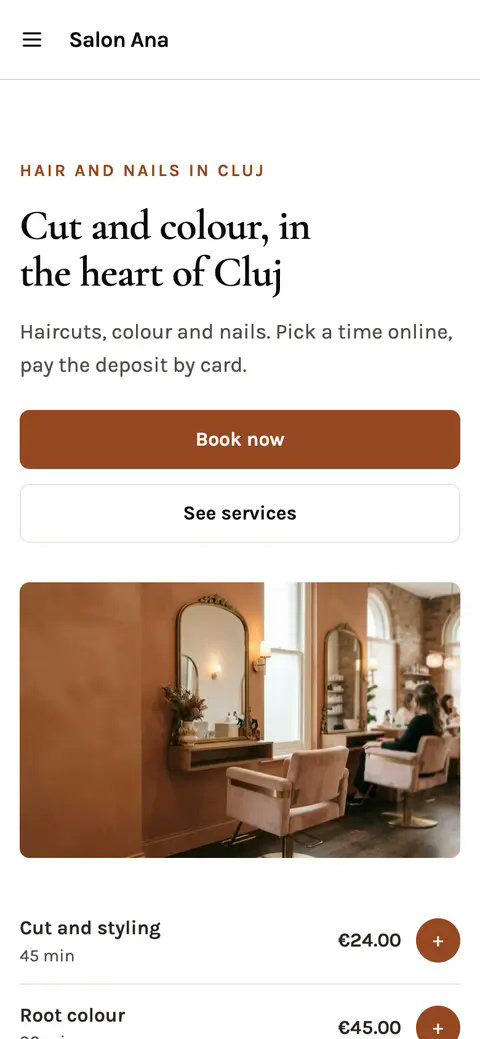
| MatrisAI | Clients choose a service, a person, and a time that is free in the team's schedule. | A site built from the owner's description; bookings appear in the team's admin calendar. |
| Fresha | Client profiles connected to appointments, with rescheduling and cancellations. As of 11/18/2026. Source | Calendar synchronization through iCalendar feeds. As of 11/18/2026. Source |
| SimplyBook.me | Service catalogs, resource assignment rules, and availability controls. As of 11/18/2026. Source | A booking widget that can be embedded on websites. As of 11/18/2026. Source |
For a service appointment, a client usually needs to identify what they want and when it can happen. For a capacity-based reservation, such as a room or a group session, the relevant question may instead be how availability is allocated. Decide which booking model your business uses before comparing tools.

MatrisAI
MatrisAI is an option for salons and other appointment businesses. The owner describes the business in their own words, and MatrisAI builds the site from that description. The owner can begin working in the admin while the design is still being finished, then change the site text, photos, and look from the admin afterwards.
For the booking flow, clients choose a service, the person they want, and a free time. The system offers only times that are actually free in the team's schedule, and each booking lands in the team's calendar in the admin. Clients receive an email confirmation and a reminder before the appointment.
Payment choices are worth comparing against your own policy. A business using MatrisAI can ask for a deposit or the full price by card at booking, or choose to take no online payment. A card can also be saved at booking so a no-show or late-cancellation fee can be charged, up to the amount the client accepted. The business can sell gift vouchers online for use on a booking.
MatrisAI sites can use the business's own domain on every plan.
Some optional capabilities depend on the plan. From the Grow plan, customers can receive an email after a visit asking them to leave a review. On the Pro plan, automatic emails can invite clients to book again when it is time for their next visit.
Pros
- Clients choose a service, a person, and an available time.
- Bookings appear in the team's admin calendar.
- Online payment can be set as a deposit, the full price, or no payment.
- Site text, photos, and look can be edited from the admin.
Check before choosing
- The facts here do not specify external calendar synchronization.
- Confirm that the available booking workflow matches your service and staffing setup.
- Check plan details for any optional functions your business needs.
Fresha
Booking and availability features: Fresha's booking engine includes client profiles connected to appointments and supports appointment rescheduling and cancellations. As of 11/18/2026, according to the cited booking-system details.
Website or calendar setup: Fresha supports calendar synchronization through iCalendar feeds. As of 11/18/2026, according to the cited calendar details.
Evaluation steps
- Test an ordinary appointment and a rescheduling request.
- Compare the client record and calendar workflow with your daily needs.
Check before choosing
- Test your required availability rules, reminders, payment steps, website experience, and administration tasks.
- Confirm current plan information and pricing before comparing total cost.
Fresha may suit you better if your priority is client profiles linked to appointments, rescheduling and cancellations, or calendar synchronization through iCalendar feeds. Those documented features are as of 11/18/2026, according to the cited Fresha details. Base your choice on a test of your full workflow, not these features alone.
SimplyBook.me
Booking and availability features: SimplyBook.me supports service catalogs, resource assignment rules, and availability controls. As of 11/18/2026, according to the cited booking-system details.
Website or calendar setup: SimplyBook.me provides a booking widget that can be embedded on websites. As of 11/18/2026, according to the cited website widget details.
Evaluation steps
- Test an ordinary appointment and a case involving a required resource.
- Review the booking journey on your website from a client's perspective.
Check before choosing
- Test your required availability rules, reminders, payment steps, website experience, and administration tasks.
- Confirm current plan information and pricing before comparing total cost.
SimplyBook.me may suit you better if your priority is an embedded booking widget, service catalogs, resource assignment rules, or availability controls. Those documented features are as of 11/18/2026, according to the cited SimplyBook.me details. Base your choice on a test of your full workflow, not these features alone.
How to choose a booking system for your small business
Start with the kind of reservations you take. A one-to-one appointment, a service with several staff members, a group class, and a capacity-based reservation each raise different availability questions. Do not assume that a tool designed around one model will suit another without testing it.
- Map the customer journey. Write down what the client selects, what information they provide, when they see available times, and when they receive a confirmation.
- Map the business-side steps. Note who needs to see a booking, where it should appear, and how staff handle reminders, payment, changes, and cancellations.
- List your non-negotiables. Separate required functions from useful extras. Include the website setup, staff and service rules, payment policy, and any calendar or communication needs.
- Check plans and total cost. Compare current plan prices, fees, and limits against the functions you need. Do not compare a headline price without checking what is covered.
- Test both sides. Make a sample booking as a client, then review the resulting admin workflow. Try a typical booking and an exception relevant to your business.
- Choose based on evidence. Keep notes on what you verified, what remains unclear, and which workflow fits your daily operation with the least unnecessary complexity.
A short scorecard can keep the comparison consistent. Rate each option against booking flow, availability, calendar handling, reminders, payment choices, website fit, administration, and cost. If a product detail is not stated in the information you are reviewing, mark it as unknown rather than assuming it is included.
The right choice is the one whose verified workflow matches your requirements and whose current plan details fit your budget. Keep a record of unanswered questions and resolve those before moving your booking process to a new system.
Website booking software questions
How do I make my own booking system?
Map your booking steps, availability rules, customer messages, and payment policy. Then compare systems using a sample booking and confirm the admin process fits your business.
What is the best scheduling software for business?
There is no single fit for every business. Compare the booking model, staff and service availability, customer journey, payment needs, plan details, and the work your team does each day.
What is the best booking system for small businesses?
Choose by workflow rather than name: test how the system handles your actual bookings, staff setup, reminders, payments, and website requirements.
What is the best hotel room booking software?
Room reservations involve capacity and availability rules that can differ from one-to-one appointments. Check that a system supports your room inventory and reservation workflow before choosing.
Your salon, online in a few minutes.
Tell us its name. We do the rest.
3 days free, then from €10 a month. Cancel any time.
Related articles
How to Choose an Online Booking System for a Small Business
Compare booking software by services, team schedules, payments, and customer experience. Use this checklist to plan your online appointments.
Online Food Ordering for Restaurants: 7 Options Compared
Explore seven restaurant ordering options. Melbourne vendor-presence figures are a research starting point, not a measure of performance.
Scheduling Software for Service Businesses: 7 Options
Compare appointment booking, field-job dispatch, and staff scheduling needs before choosing a tool for your service business.